Quick answer: Good payroll software in Mumbai must get three things right. It must apply Maharashtra professional tax correctly, including the women’s ₹25,000 threshold and the February ₹300. It must deduct the Labour Welfare Fund twice a year. And it must answer your call during payroll week. Test those in the demo with your own employee cases, not the vendor’s sample data.
What do Mumbai SMEs Need from Payroll Software?
Mumbai SMEs need payroll that gets Maharashtra’s rules right, handles staff spread across offices and homes, and doesn’t go silent at month-end. Most payroll challenges here aren’t about features. They show up as edge cases: a mid-month joiner, a remote hire in another state, or a salary cut by unpaid leave. Choosing payroll software in Mumbai that supports these scenarios can help businesses manage payroll more consistently.
A typical setup looks like this: 80 people in Andheri or BKC, a dozen in Pune, three salespeople working from Bengaluru and Ahmedabad, and hybrid work for half the team. That’s one company, but several PT rules apply.
The questions people ask on public tax forums say a lot. On CAclubindia, an employer asked whether Maharashtra PT applies to staff working outside the state. They also asked which slab applies when absences cut someone’s salary. The thread was marked “resolved” without answering either question.
Before choosing a provider, check how it handles state-specific deductions and statutory reporting. OpportuneHR’s payroll compliance software covers state-wise professional tax, Labour Welfare Fund obligations and other statutory requirements.
How Should you Score Payroll Vendors?
Score vendors on what goes wrong most often, not on feature count. Weight Maharashtra compliance and payroll-week support highest, because those failures hit every employee at once. Then compare total cost over two years, not the price on the website.
| Criteria | Weight | Vendor A | Vendor B |
| Maharashtra compliance accuracy (PT, MLWF, multi-state) | 25% | 4 | 3 |
| Support during payroll week | 20% | 3 | 5 |
| Total cost over two years | 20% | 4 | 3 |
| Flexible salary structures | 15% | 3 | 4 |
| Employee self-service and mobile | 10% | 5 | 3 |
| Exporting your data if you leave | 10% | 2 | 4 |
| Weighted score (out of 5) | | 3.6 | 3.7 |
Results: Vendor A looked better in the demo. Vendor B wins once support and data exit are weighted properly. This happens more often than you’d think.
If you’re still comparing providers, use this payroll software comparison guide to review compliance, reporting, integrations, employee self-service and support before making your final decision.
What Will it Really Cost, and How Fast can You Go Live?
Expect two to six weeks to go live for a company under 200 people, if your data is clean. For cost, ask for a two-year quote with every add-on included. Vendors price per employee, as flat plans or in tiers, so headline prices rarely offer a like-for-like comparison. Read our guide to HRMS and payroll software pricing in India to understand how implementation, integrations and additional modules affect the total cost.
Ask what costs extra:
- One-time setup or implementation fee
- Statutory filing, such as PT, MLWF and TDS returns
- Biometric, Tally or bank integrations
- Adding a second company or GSTIN
- The renewal increases in year two
The old advice was to pick the cheapest plan that covers payroll. That’s wrong now, because most plans gate statutory reports and integrations behind higher tiers. A ₹40-per-employee plan can become ₹90 once you add what you actually need.
Automated payroll processing only saves time if your data goes in clean. Read our 90-day HRMS implementation plan before you sign. Before signing, review our guide to pre-payroll preparation to understand the checks needed before processing salaries
7 Questions You Should Ask in a Mumbai Payroll Demo?

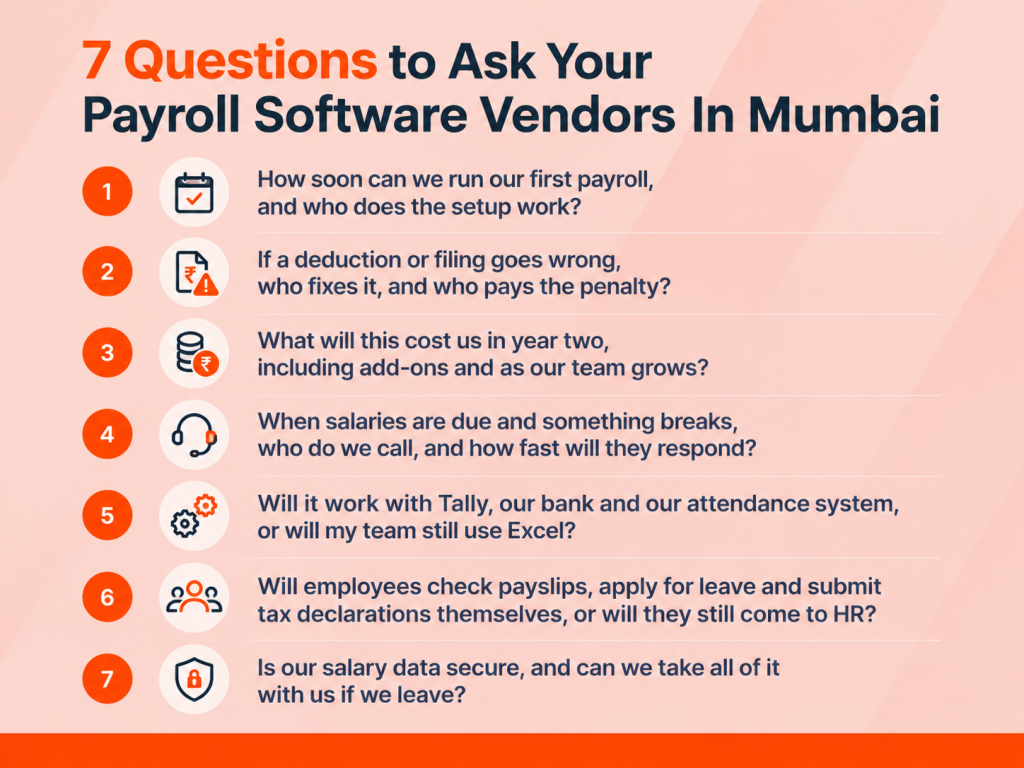
Send these seven questions to every vendor before the demo. Then score the live answers. A vendor who can’t show the answer on screen with your data is telling you something.
- How soon can we run our first payroll, and who does the setup work?
Setup is where most payroll projects stall. If the vendor only sends a template, your HR team ends up doing the migration on top of their regular month-end work. A named implementation person and a written go-live date tell you the vendor owns the outcome. - If a deduction or filing goes wrong, who fixes it, and who pays the penalty?
In law, the penalty for a wrong PT, MLWF or TDS deduction falls on the employer, not the software company. So you need to know whether the vendor updates rules on time and fixes errors before you file. To test it, ask them to calculate PT for a woman earning ₹24,000 in February. The correct answer is nil. - What will this cost us in year two, including add-ons and as our team grows?
Launch prices are often low, while statutory reports, integrations and renewals cost extra. A written two-year figure lets you compare vendors fairly. It also shows whether the price will still make sense when you go from 50 to 150 people. - When salaries are due and something breaks, who do we call, and how fast will they respond?
Payroll problems don’t wait. A ticket answered in three days is useless when salaries are due tomorrow. A named support team and a written response time during payroll week protect your employees’ trust and your HR team’s sanity. - Will it work with Tally, our bank and our attendance system, or will my team still use Excel?
Every manual export is another chance to make a mistake. If attendance, payroll and accounts don’t connect, your team ends up copying numbers between systems, and errors slip in. Review this guide to payroll software integration with accounting systems to understand how integrated data flows can reduce manual entry and reconciliation. - Will employees check payslips, apply for leave and submit tax declarations themselves, or will they still come to HR?
Most HR time goes on answering “where’s my payslip?” and “how much leave do I have? If employees can find those answers on their phones, HR gets hours back every week. Learn how an employee self-service portal helps staff access payslips, check leave balances and manage routine HR requests. - Is our salary data secure, and can we take all of it with us if we leave?
Salary and bank details are some of the most sensitive data a company holds. India’s data protection rules make the employer accountable for that data from May 2027. You also need a clean way to export everything, so switching vendors later doesn’t mean losing your payroll history. When evaluating a provider, confirm its role-based access controls, audit trail and data-export options. The HRMS software features checklist can help you assess these requirements alongside payroll functionality
What Should You do Before Your First Demo?
Email these seven questions to every vendor on your shortlist this week. Ask them to answer using three of your real employees. Score the replies using the scorecard. Then book demos only with the vendors who answered in writing. If you’re comparing payroll software in Mumbai, OpportuneHR will take the same test.
- What is the best payroll software in Mumbai for SMEs?
The best payroll software for a Mumbai SME handles Maharashtra professional tax and the Labour Welfare Fund automatically. It should connect to Tally and your bank, and come with a support team that responds during payroll week. Compare vendors on total cost over two years, setup time and data export, not on feature lists. - Can it process hybrid employees?
Yes, if it stores a work location for each employee. Professional tax follows where the person works, not where the head office is. A salesperson working from Bengaluru falls under Karnataka’s rules, while your Pune team stays under Maharashtra’s. The software should switch states automatically when someone relocates. - What support should Mumbai companies expect?
Expect a named support contact, a written response time and extra cover during payroll week, usually the 25th to the 5th. Phone or chat support should resolve urgent salary issues the same day. Ask whether statutory rule changes are updated for you at no extra cost. - What does migration involve?
Migration means moving employee records, salary structures, bank details and leave balances into the new system. If you switch mid-year, it also includes year-to-date TDS, PF, ESI and PT. Most SMEs then run one or two parallel payrolls to check the results match. Small teams with clean data can go live in two to six weeks.


 Visited 3 times